Connect your org chart with your payroll and centralize talent

The difference isn't just the platform. It's the combination of a living org chart, a human team that truly supports you, and AI agents that organize all your people data.

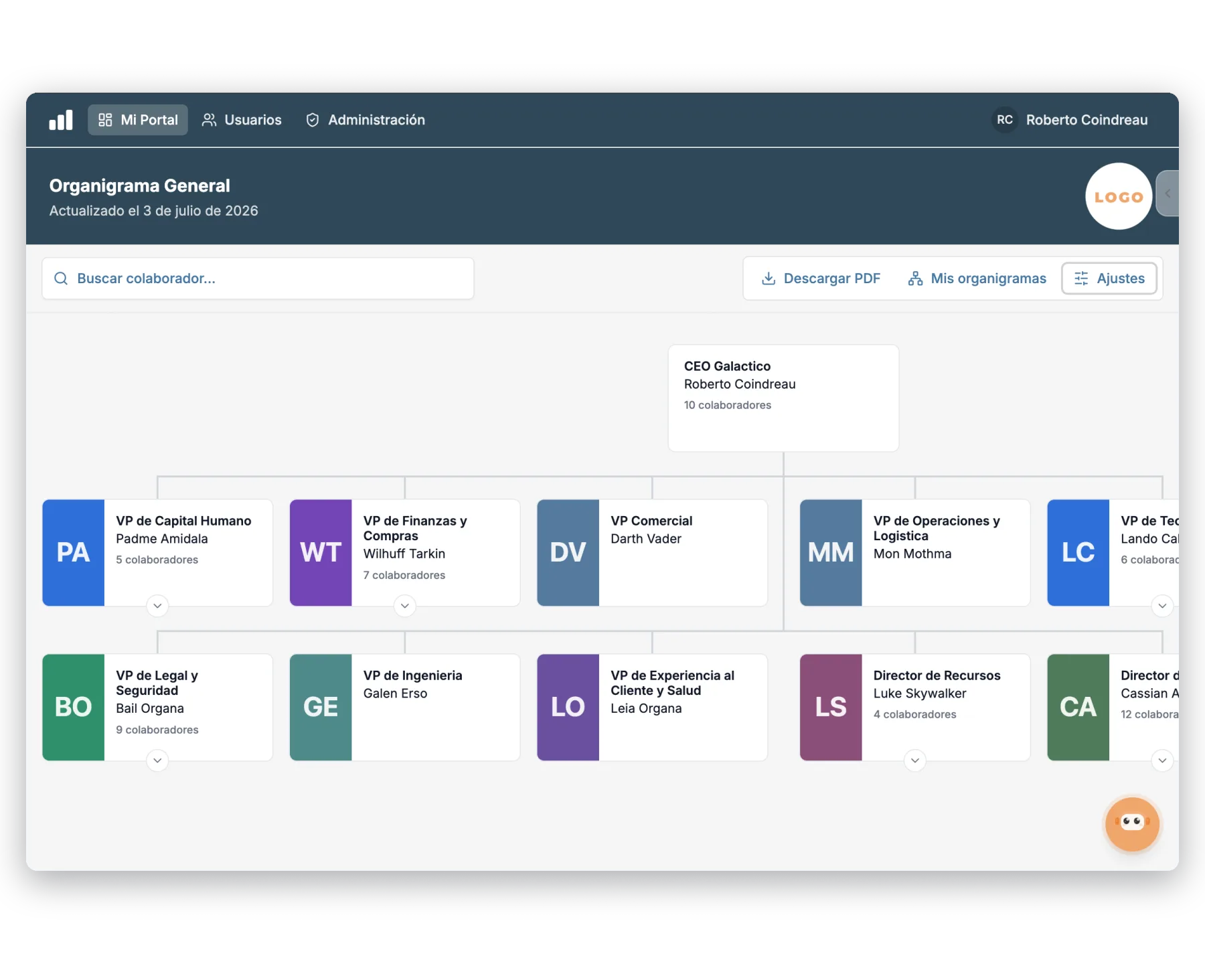
Interactive org chart with photos, positions, and head count by area in Integratec's platform
+1M
assessments
+1000
clients running
+16
countries

Organize your talent and much more (if you need it)

The org chart is just the start. Our entire talent platform, in one place.

Performance & Development

  • Organizational charts
  • OKRs & KPIs
  • 360 · 180 feedback
  • 9-Box Matrix
  • AI-powered plans

Recruiting

  • ATS · Pipeline
  • Requisitions and openings
  • Personality assessment
  • Onboarding

Satisfaction

  • Surveys and pulses
  • Work climate
  • Internal communication

Compliance

  • NOM-035
  • NOM-037
  • Ley Silla

Training

  • LMS and learning paths
  • Your own content
  • Certificates

People Administration

  • Employee records
  • Vacations and incidents

Four moments. From payroll to full management.

You connect with your payroll, give your people access, map talent and performance, and measure coverage across the whole organization.

  1. 01 Connection

    You connect with payroll

  2. 02 Access

    You give your people access

  3. 03 Talent

    You map talent

  4. 04 Analytics

    You measure coverage

Step 01 · You connect with payroll

Build your org chart from your payroll or ERP

The structure builds itself from your positions and stays up to date without manual work.
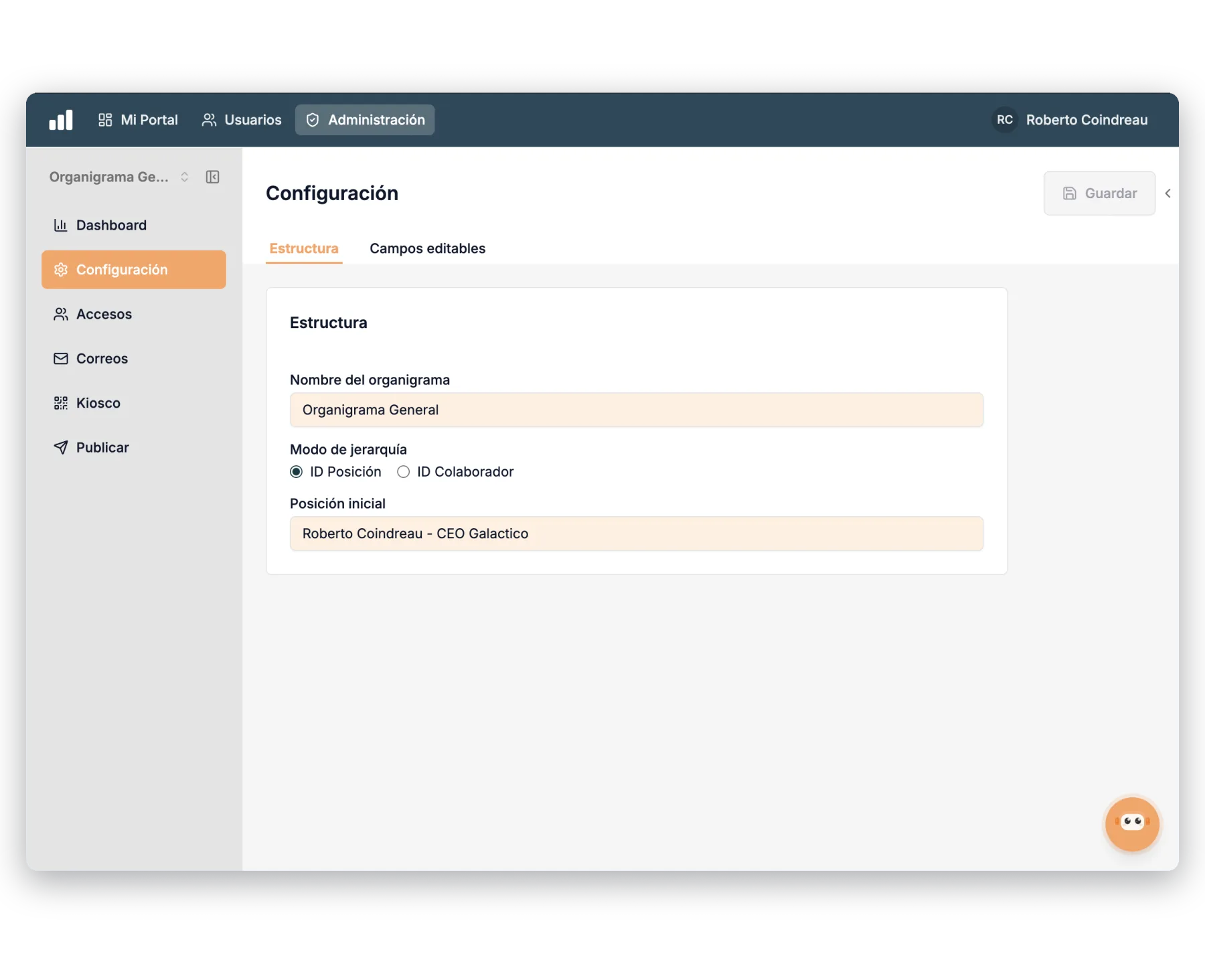
  • Payroll or ERP syncThe org chart updates whenever your structure changes.
  • Hierarchy by position or employeeChoose how your company's reporting line is built.
  • Configurable starting positionDefine which position each org chart starts from.
  • Editable fields by positionAdjust the visible information without touching the original source.
Connect your org chart →
Org chart configuration with hierarchy mode by position and starting position
Our team

A consultant connects your payroll or ERP and leaves the org chart built and validated.

With artificial intelligence

Detects inconsistent reporting lines and suggests how to organize the structure.

Step 02 · You give your people access

Everyone sees the org chart they should

Publish the org chart to the whole organization with clear permissions by user and by role.
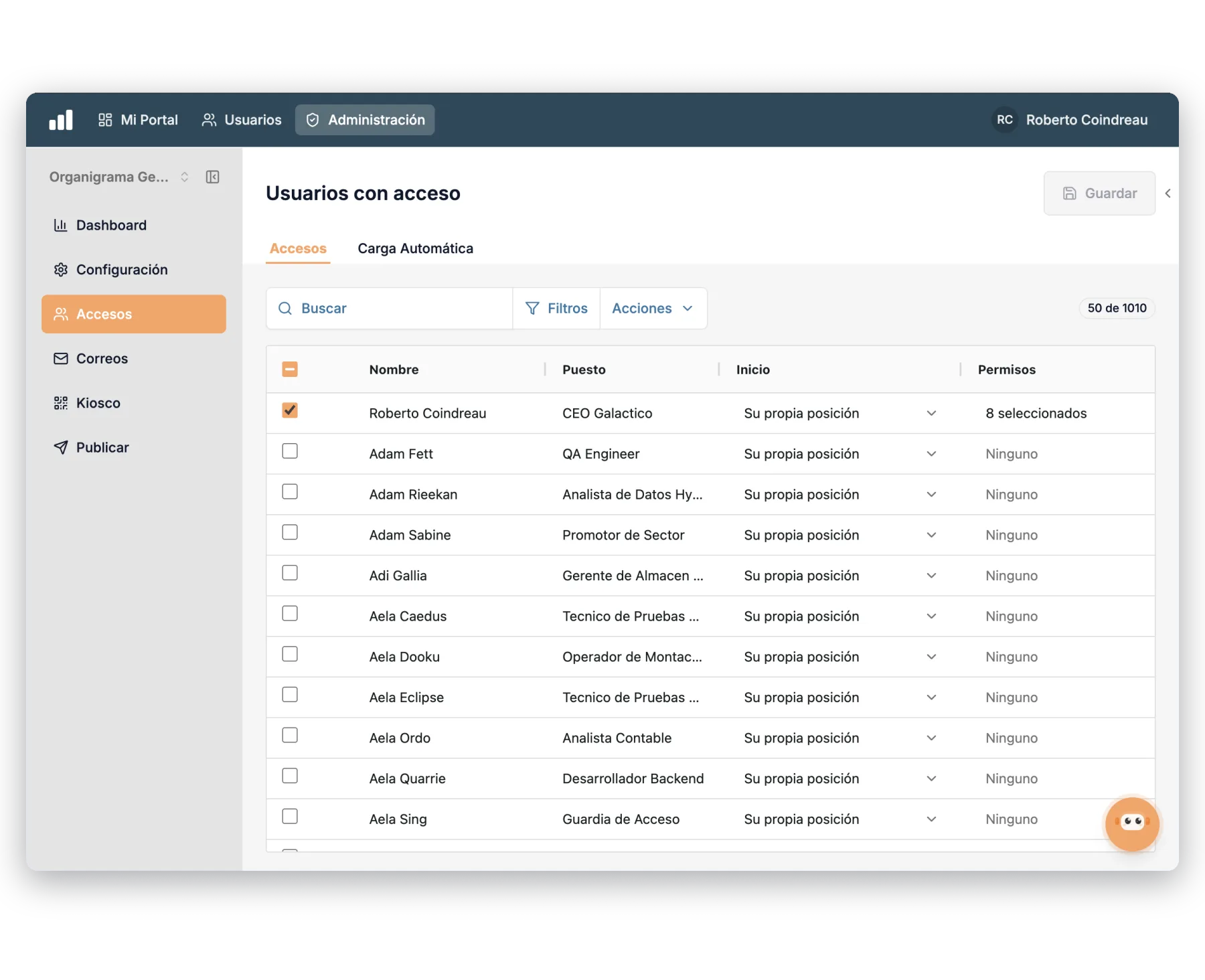
  • Permissions by user and roleDefine who sees the whole structure or just their branch.
  • Access from their own positionEvery employee lands on the view that corresponds to them.
  • Kiosk and publishingShare the org chart online, from any device.
  • Bulk access uploadAssign permissions in bulk without configuring them one by one.
Control access in a demo →
Users with access to the org chart and permissions by position and by role
Our team

We define your access policy with you and leave the org chart ready to publish.

With artificial intelligence

Suggests the right access level based on each employee's position and branch.

Step 03 · You map talent

Color your org chart by talent and performance

Turn the structure into a map: talent, psychosocial risk, climate, and 360 feedback results over every position.
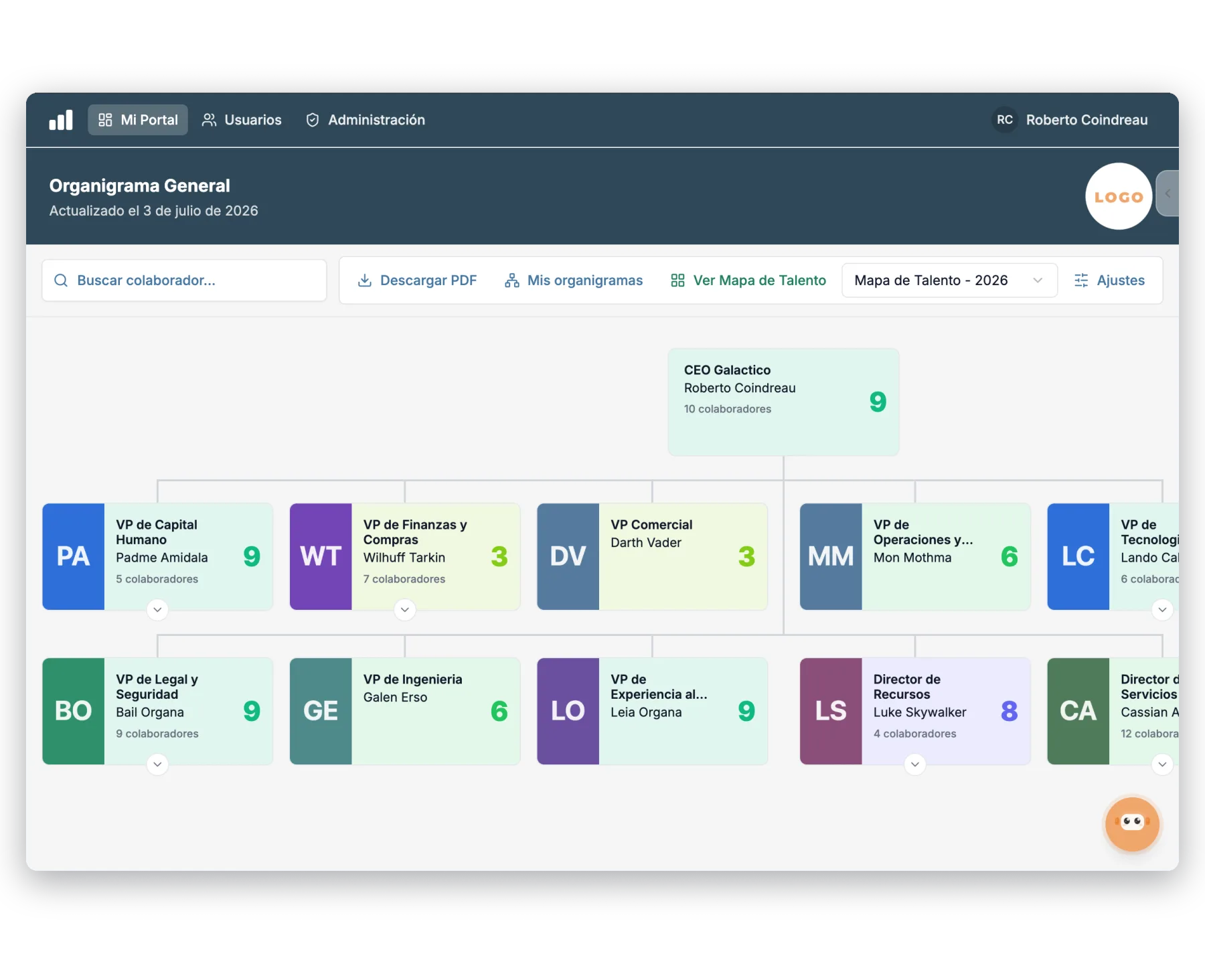
  • 9-Box Talent MapVisualize each employee's quadrant over the org chart.
  • NOM-035 by individual and branchLocate psychosocial risk by person and by branch.
  • Climate by areaColor the structure according to each team's favorability.
  • 360 Feedback resultsCheck individual and branch-wide performance at a glance.
Map your talent →
Org chart colored by talent map with each employee's 9-Box quadrant
Our team

We review the talent map over the structure with you and detect risk and succession needs.

With artificial intelligence

Highlights branches with risk, low favorability, or key talent worth retaining.

Step 04 · You measure coverage

Head count and coverage in a single dashboard

Track who has access, how many people hang from each branch, and download the structure whenever you need it.
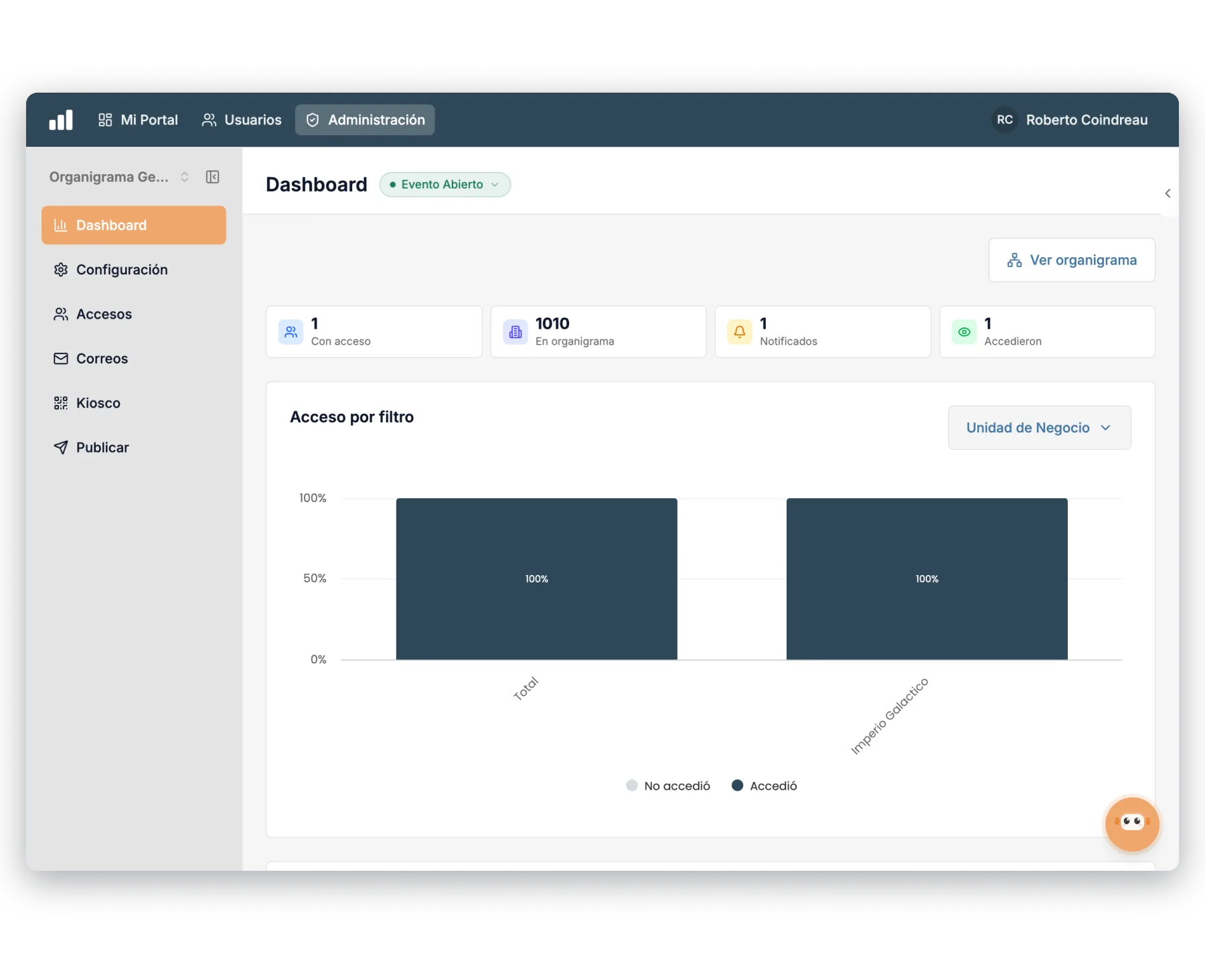
  • Direct and total head countCheck how many employees report into each position.
  • Access by filterAnalyze coverage by business unit and by area.
  • Notified and who accessedTrack how the org chart is being rolled out.
  • PDF downloadExport the complete org chart to share or print.
See the dashboard in a demo →
Org chart dashboard with head count, access by filter, and notified employees
Our team

We help you read coverage and connect the org chart with performance, recruiting, and payroll.

With artificial intelligence

Summarizes coverage by area and flags unbalanced spans of control.

We protect your operation on three fronts.

Beyond organizing your structure, the platform safeguards continuity, access, and interoperability so your operation never depends on improvisation.

Cybersecurity

Controls to reduce risk and protect access

  • Visibility permissions by user and role
  • Own password or SSO access
  • Secure connections over HTTPS
  • Activity traceability
Backups

Continuity so you never lose critical information

  • Scheduled database backups
  • Incident recovery
  • Exports for additional safekeeping
  • Historical data availability
Integrations

Connectivity to operate with your current stack

  • Microsoft 365
  • Google Workspace
  • Integratec API
  • SMTP / SSO / SAML
  • Webhooks

Frequently asked questions about organizational charts

Does it connect with our payroll or ERP?

Yes. The org chart is built from your positions and employees, and stays up to date whenever your structure changes, without redoing it by hand.

Who can see the org chart?

You decide. You set permissions by user and by role: some see the whole structure, and some only see their branch or their own position.

Can I see talent and performance over the structure?

Yes. You can color the org chart by 9-Box Talent Map, NOM-035, climate, and 360 feedback results, individually or by branch.

Does it show head count and costs?

Yes. Check the direct and total head count of each branch and analyze coverage by business unit and by area from the dashboard.

What role do AI agents play?

They detect inconsistencies in reporting lines, highlight branches with risk or key talent, and summarize coverage, without taking judgment away from HR or managers.

Is this just software?

No. It's software, human support, and AI agents in a single experience. That combination is what sets us apart.

Next step

If you're looking for your org chart to stop being static and become the center of your talent management, we'd love to show you how.