Training needs assessment by job position

Each manager defines what every role on their team needs to learn: technical topics, tools with the required level, and soft skills. You get it all consolidated to build your training plan.

Get a demo →
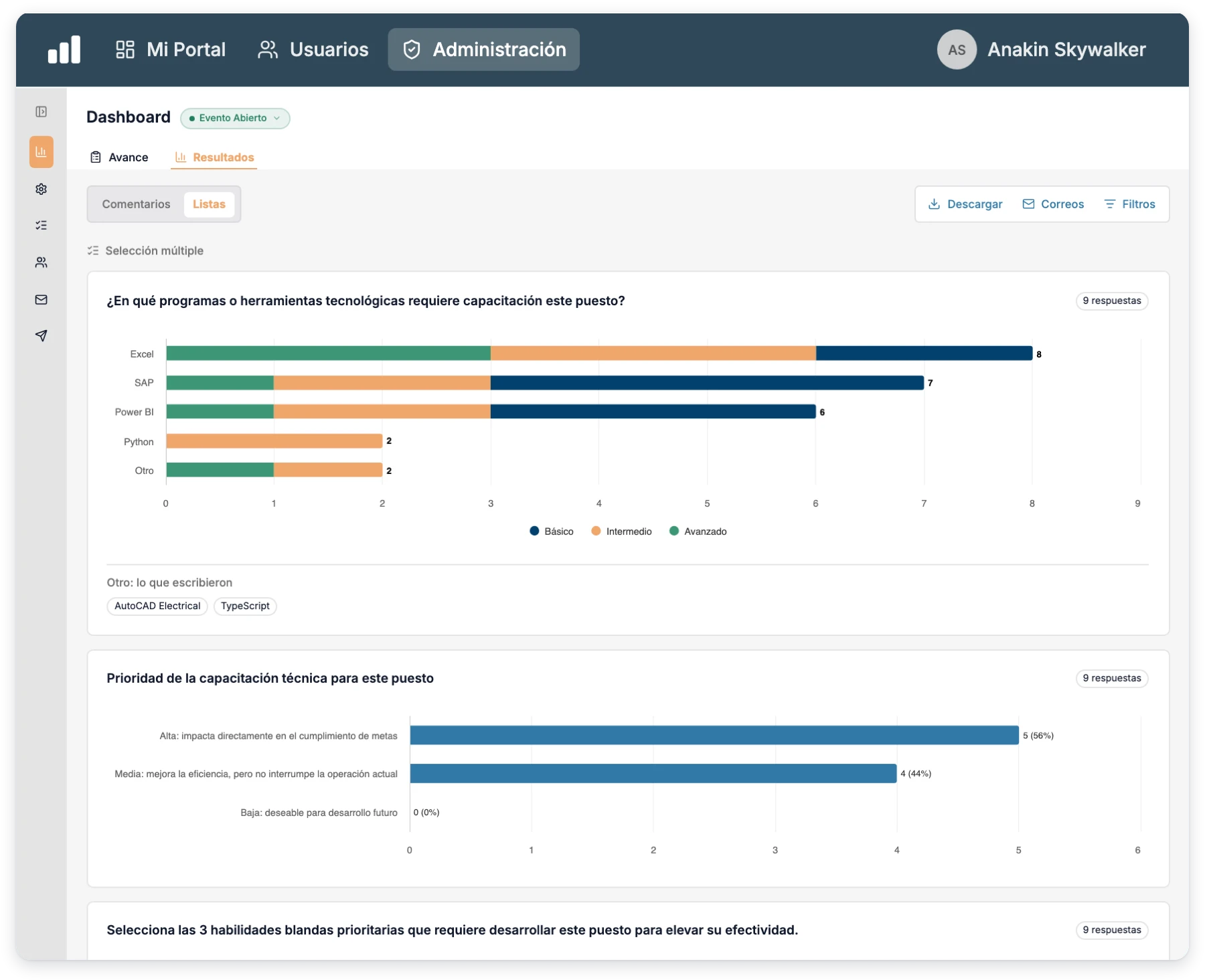
Training needs assessment results with required tools by level and filters by leader and position
+1M
users
+1000
clients running Integratec
+16
countries

Assess training needs and much more (if you need it)

The training needs assessment is just the start. Our whole talent platform, in one place.

Satisfaction

  • Surveys and pulses
  • Work environment
  • Internal communication

Performance & Development

  • OKRs and KPIs
  • 360 · 180 Feedback
  • 9-Box Matrix
  • AI-powered plans
  • Organizational charts

Recruiting

  • ATS · Pipeline
  • Requisitions and job openings
  • Personality assessment
  • Onboarding

Compliance

  • NOM-035
  • NOM-037
  • Chair Law (Ley Silla)

Training

  • LMS and learning paths
  • Your own content
  • Certificates

People Administration

  • Personnel files
  • Time off & absences
Step 01 · You choose who assesses

Leaders and positions from your org chart

Select the managers and the system assigns them the positions of their direct reports. No lists built by hand.
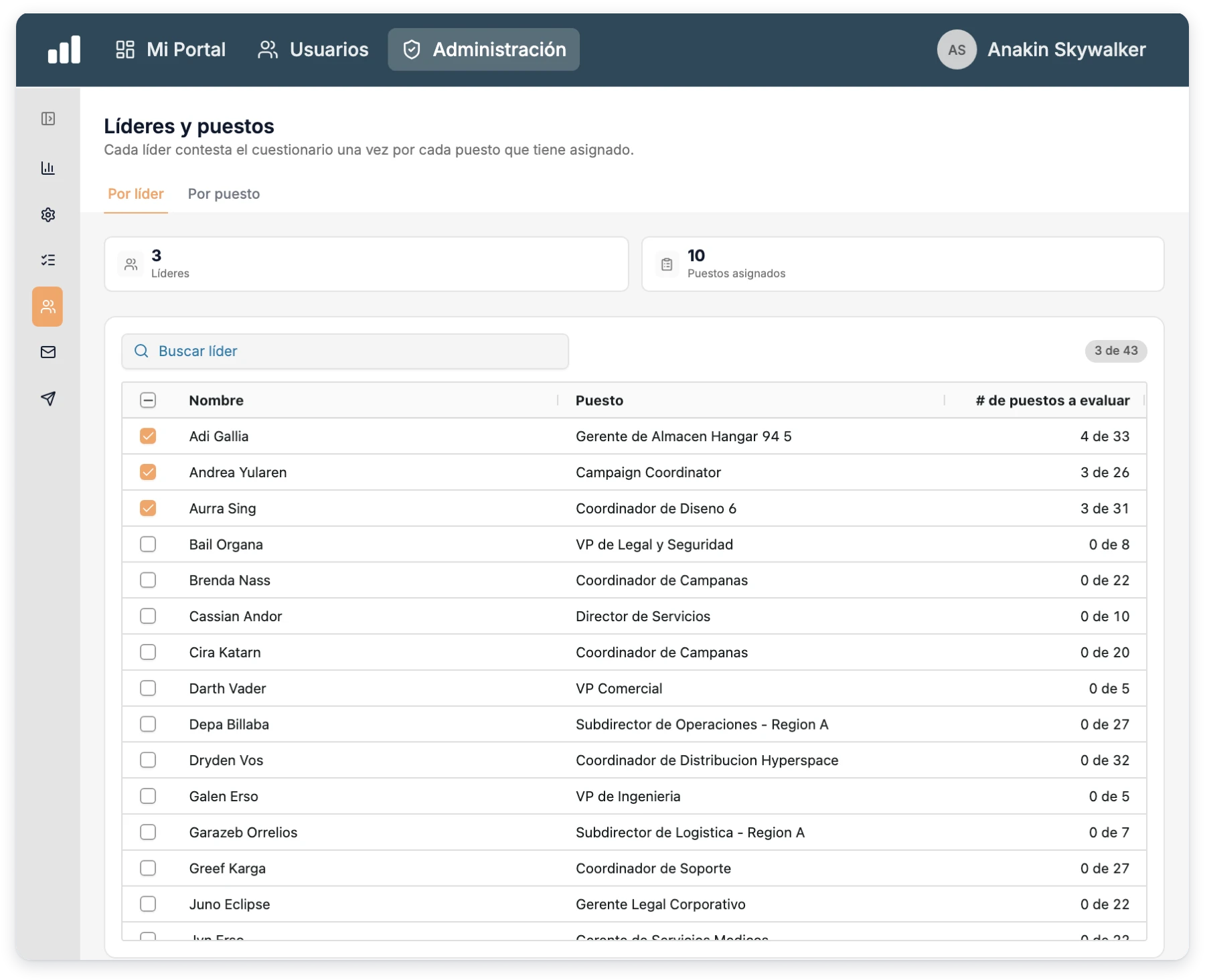
  • By leaderPick a manager and every position on their direct team comes with them.
  • By positionDecide which positions are assessed and which aren't, with the number of employees and leaders in each.
  • The manager answersThe person who knows the role day to day defines what's missing.
  • Always up to dateTerminations and rehires in your workforce are reflected in the assignment.
Set up your assessment in minutes →
Assignment of leaders and positions to assess, with position progress per leader
Step 02 · You define what to ask

A questionnaire ready to use

It starts from a 10 question template across three dimensions, and you can edit it however you like.
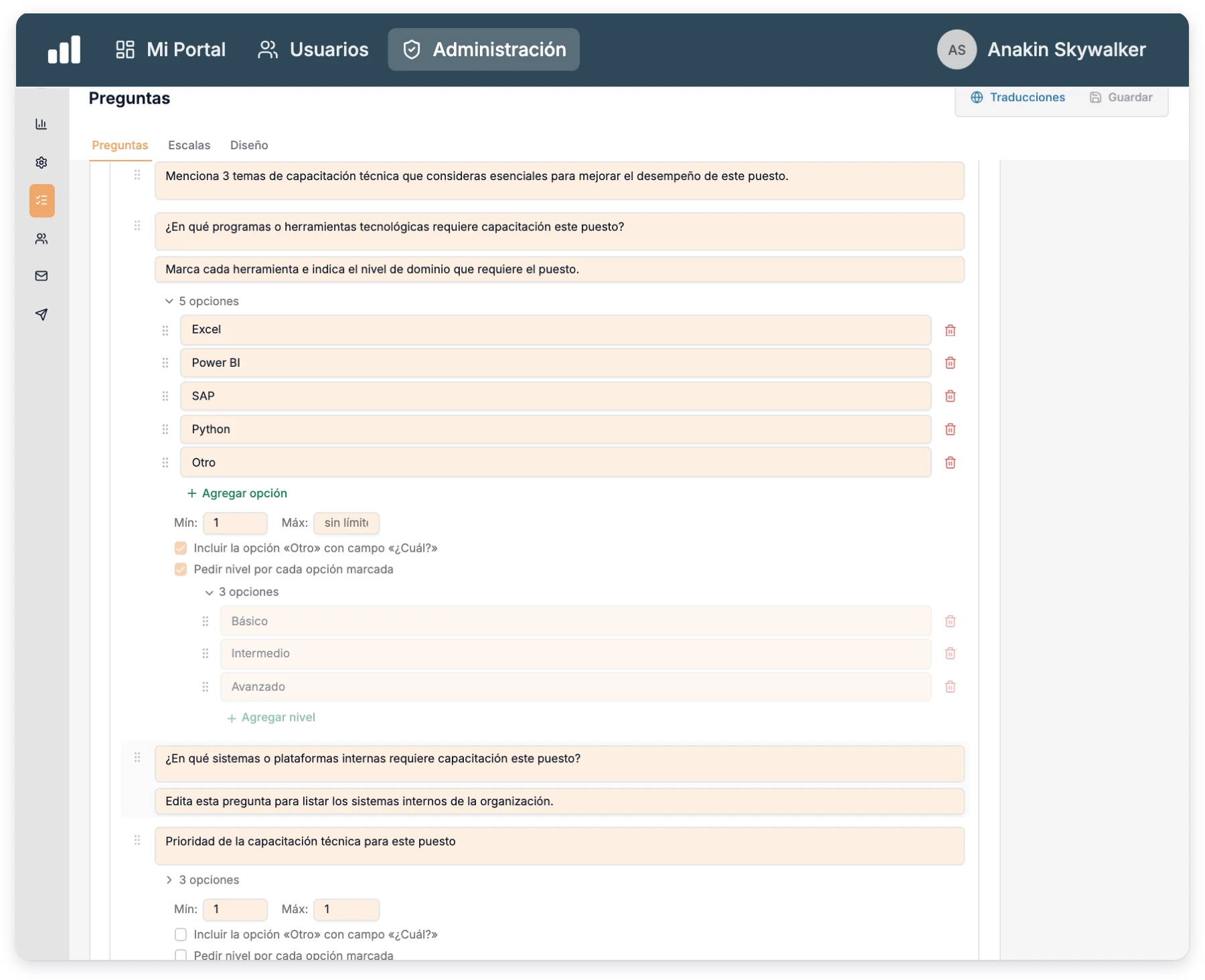
  • Technical trainingRecurring mistakes, essential topics, tools and internal systems for the role.
  • Required levelFor each tool (Excel, Power BI, Python…) the manager marks whether basic, intermediate or advanced is needed.
  • Soft skillsPick the three that matter most and describe a real scenario where they're needed.
  • Priority and formatHigh, medium or low priority, preferred training format and a result indicator.
See the questionnaire →
Tools question with basic, intermediate or advanced level and an option to add another
Step 03 · Managers respond

One questionnaire for each position on their team

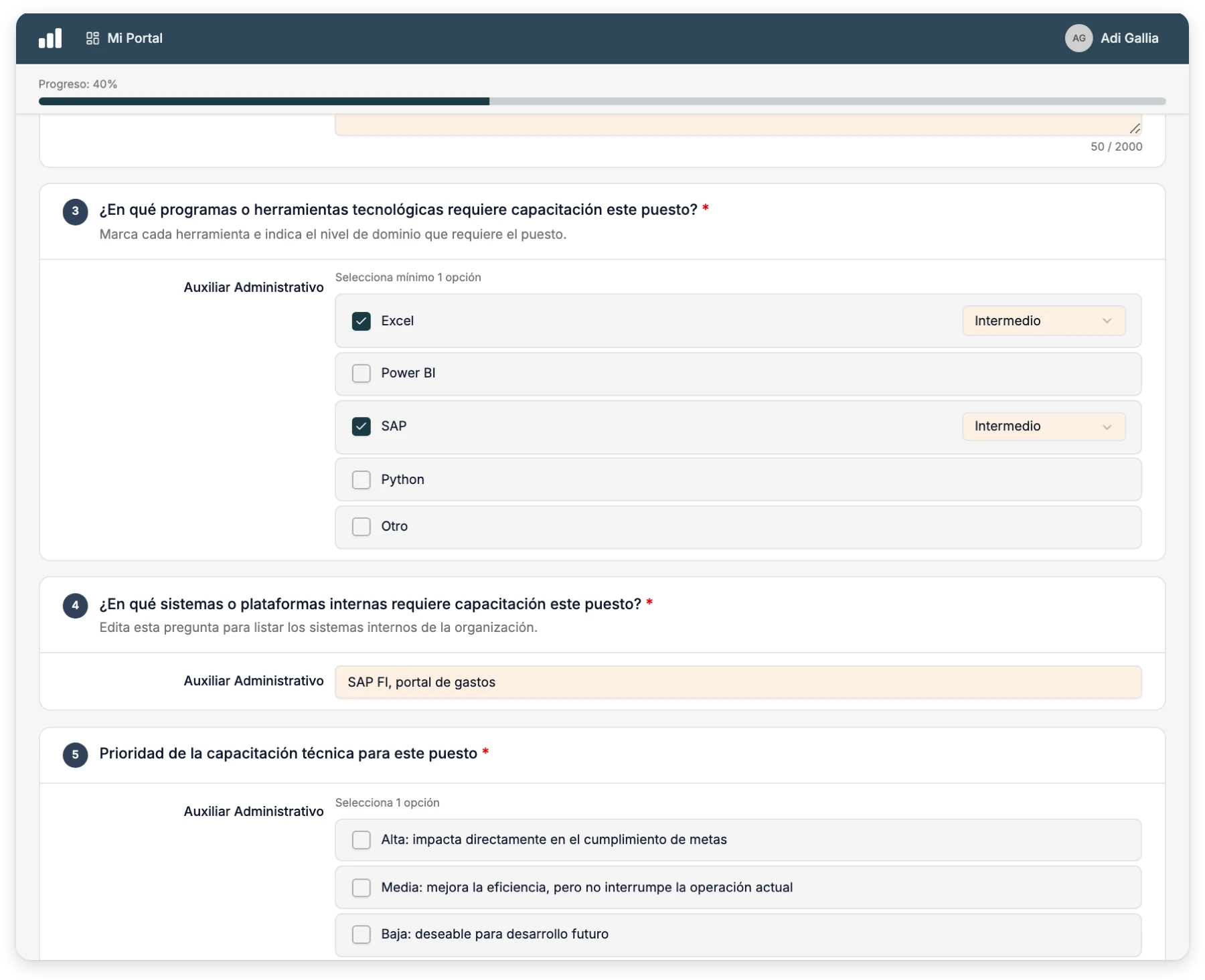
The manager thinks about the job profile, not the person, and goes position by position at their own pace.
  • A single emailEach leader gets one invitation listing all of their positions.
  • All in My PortalTheir welcome screen lists every position with its status, and opens each questionnaire from there.
  • Draft per positionSave and come back later. Submitting a position moves on to the next pending one.
  • Reminders for what's pendingReminders only include the positions still missing.
See the leader experience →
Leader questionnaire for one position, with the tools it requires and their level
Step 04 · You read the results

Needs consolidated by leader and by position

Every submitted position counts as one response, and a single view shows what's needed and at what level.
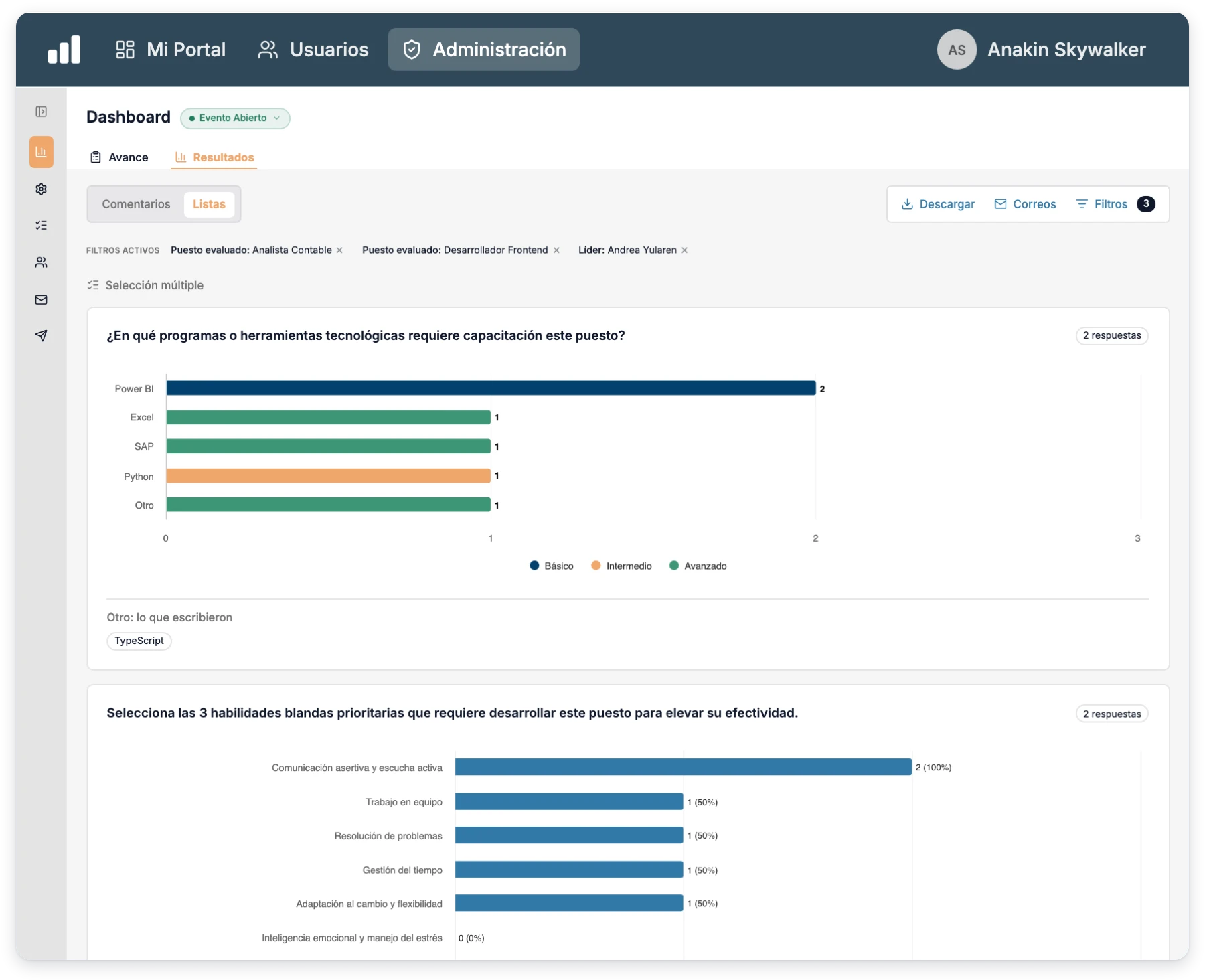
  • Charts by levelHow often each tool is requested and at what level, with “Other” answers grouped.
  • Filters by leader and positionFocus the analysis on one manager or one specific position.
  • AI analysisSummarizes open answers to surface common themes without reading them one by one.
  • Excel and PDFOne row per leader and position in Excel, and the breakdown by level in PDF.
See the results in a demo →
Training needs results with tools and skills stacked by required level

We protect your operation on three fronts.

Beyond organizing your training needs assessment, the platform safeguards continuity, access, and interoperability, so your operation never depends on improvisation.

Cybersecurity

Controls to reduce risk and protect access

  • Visibility permissions by user and role
  • Your own password or SSO access
  • Secure connections over HTTPS
  • Activity traceability
Backups

Continuity so you never lose critical information

  • Scheduled database backups
  • Incident recovery
  • Exportable files for extra safekeeping
  • Historical data availability
Integrations

Connectivity to work with your current stack

  • Microsoft 365
  • Google Workspace
  • Integratec API
  • SMTP / SSO / SAML
  • Webhooks

Frequently asked questions about the training needs assessment

What is a training needs assessment?

It's a diagnosis of what each position needs to learn to do the job well. It's the foundation for a training plan with clear priorities.

Why does the manager answer instead of the employee?

Because the manager knows what the role demands and which mistakes keep happening. They answer about the job profile, not a person, so the result applies to everyone in that position.

Can I change the questions?

Yes. The template has 10 questions across three dimensions (technical training, soft skills, and format and impact), and you can edit, remove or add whatever you need.

How do I know who should receive it?

From your org chart. You pick the leaders and the system assigns them the positions of their direct reports. You can also decide position by position which ones are assessed.

Are the responses anonymous?

No, by design. Each response is tied to the leader and the assessed position so you know where every need comes from.

Is this just software?

No. It's software, human support and AI agents in a single experience. We help you define the positions to assess, adjust the questionnaire and launch without friction.

Next step

If you want to know what training each position needs before investing in courses, we'd love to show you how.