Measure your team's happiness with one click

An ongoing pulse that lands in your employees' inbox on its own. They answer with an emoji and you see how happiness moves in every area, period after period.

Get a demo →
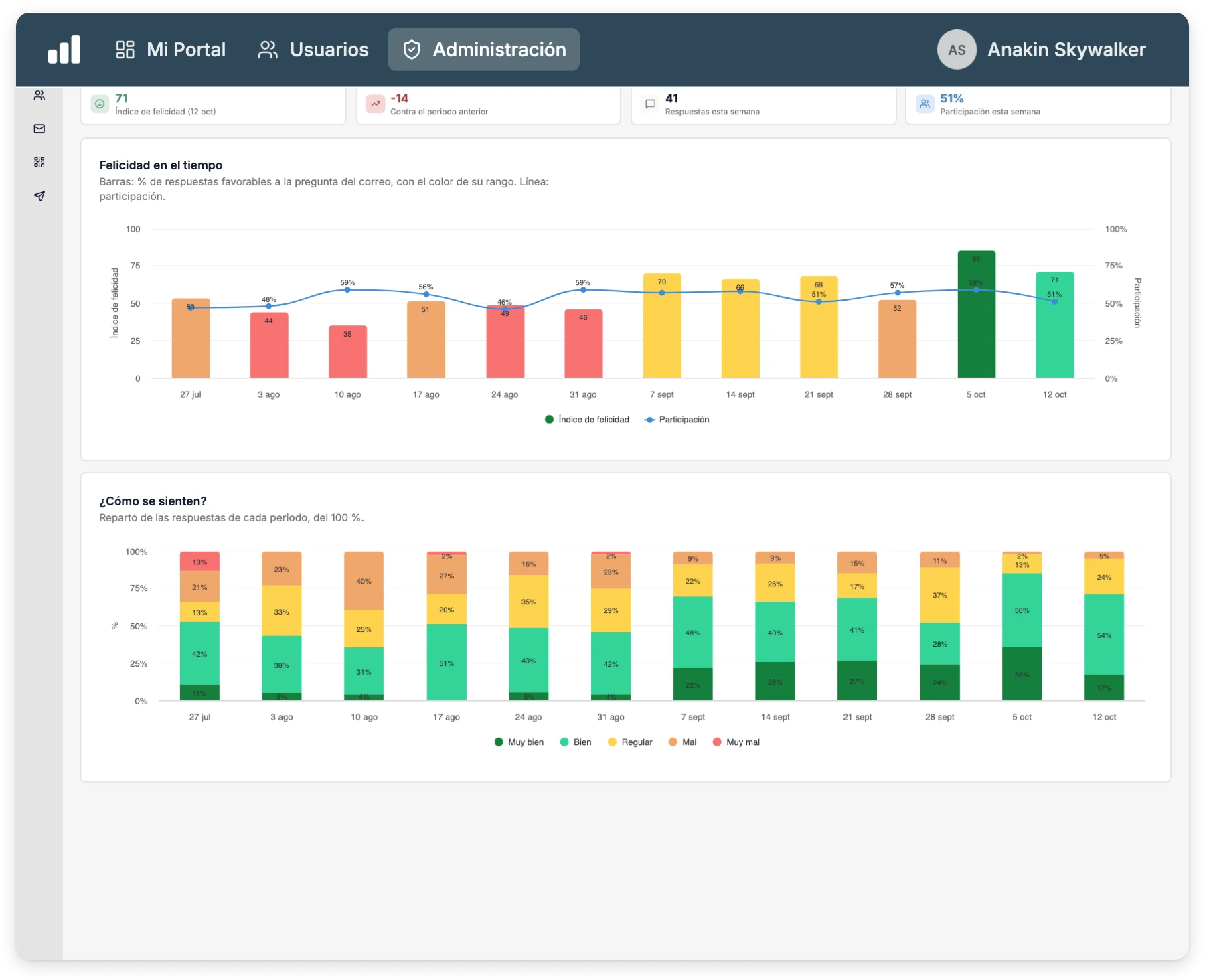
Happiness index for the period with its trend over time and the breakdown of answers
+1M
users
+1000
clients running Integratec
+16
countries

Measure happiness and much more (if you need it)

Happiness is just the start. Our whole talent platform, in one place.

Satisfaction

  • Surveys and pulses
  • Work environment
  • Internal communication

Performance & Development

  • OKRs and KPIs
  • 360 · 180 Feedback
  • 9-Box Matrix
  • AI-powered plans
  • Organizational charts

Recruiting

  • ATS · Pipeline
  • Requisitions and job openings
  • Personality assessment
  • Onboarding

Compliance

  • NOM-035
  • NOM-037
  • Chair Law (Ley Silla)

Training

  • LMS and learning paths
  • Your own content
  • Certificates

People Administration

  • Personnel files
  • Time off & absences
Step 01 · You set up the pulse

A pulse that sends itself

Choose how often to ask and the invitation goes out on its own, in your account's local time.
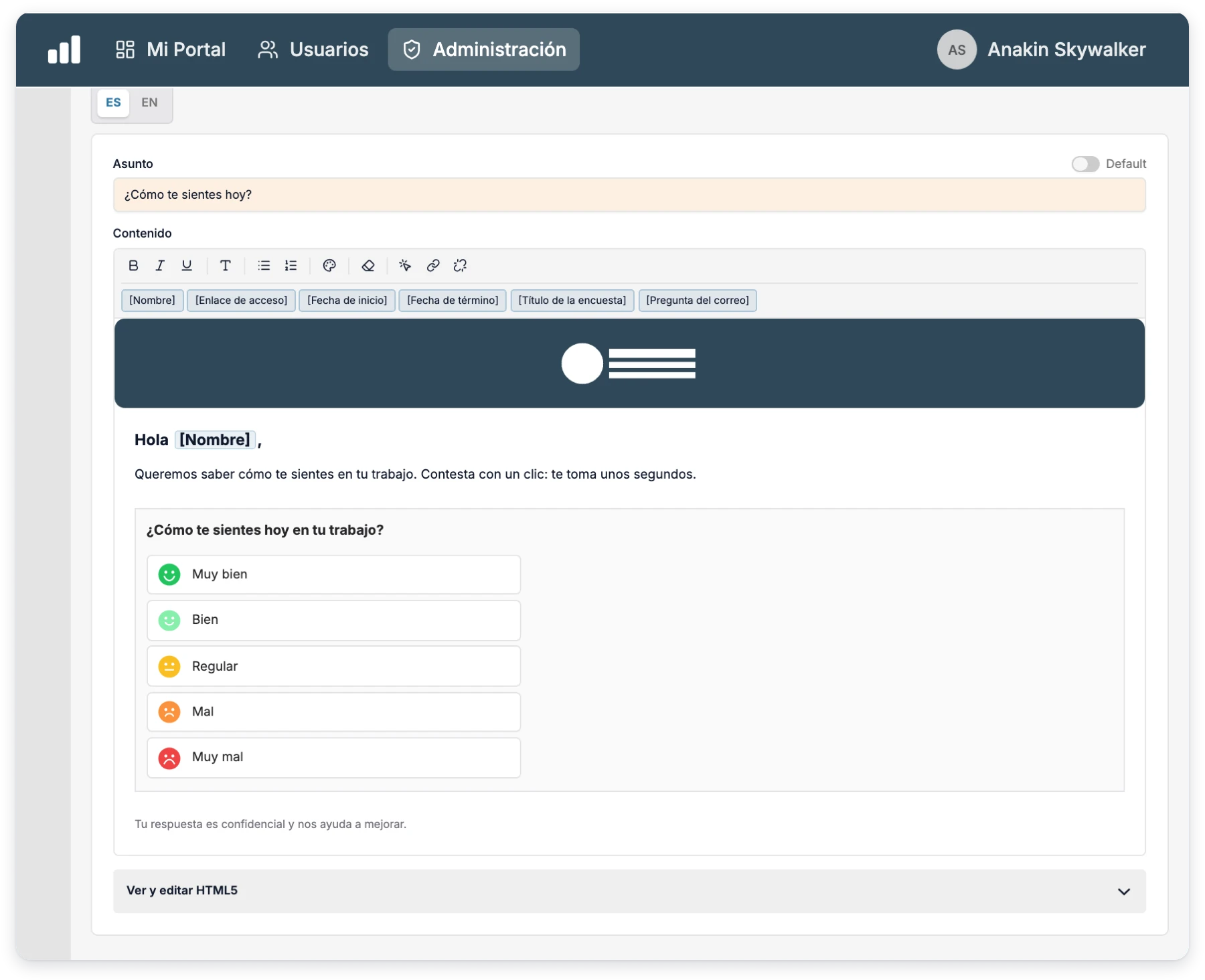
  • Your frequencyOnce a day, a week, a month or a quarter.
  • Automatic sendsNo sends on weekends, with a minimum gap between one and the next.
  • Only to who's missingInvitations and reminders only reach people who haven't answered this period.
  • Participants always currentLoaded automatically from your employee roster.
Set up your pulse →
Invitation email with the happiness question and five emoji faces to answer
Step 02 · Your people answer

Answering takes one click

The question arrives by email, and tapping an emoji is enough for the answer to count.
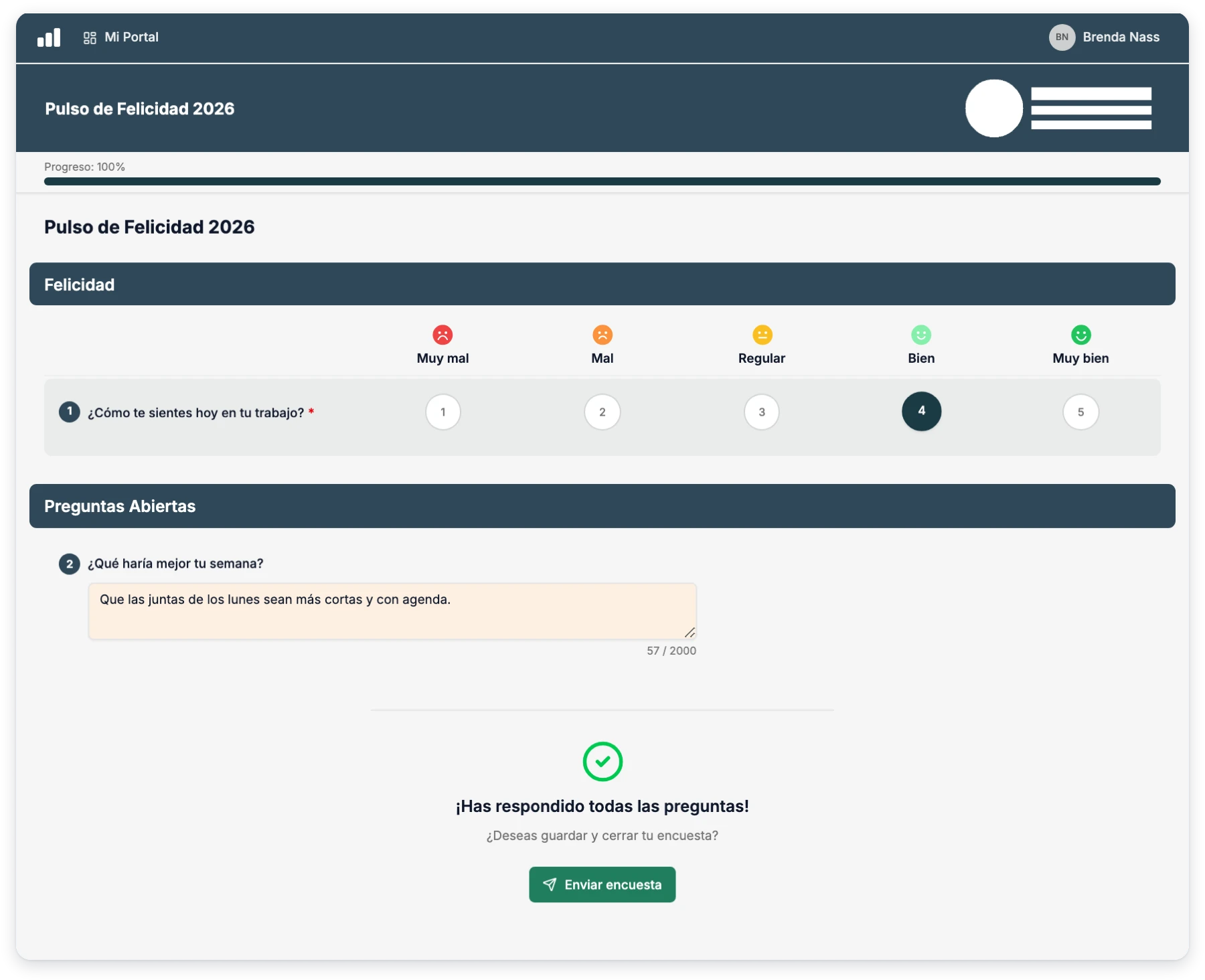
  • Emojis or eNPSVery bad, bad, okay, good or very good, or a 0 to 10 scale.
  • Right from the emailOne click and done. They can continue with the rest of the survey if they want.
  • Also in My PortalThe Happiness card shows whether they already answered this period.
  • Reliable answersProtection so email link scanners don't answer on anyone's behalf.
See the employee experience →
Happiness survey opened by an employee with the selected emoji
Step 03 · You track participation

Participation in real time

Know who answered this period, how they did it and how participation is trending.
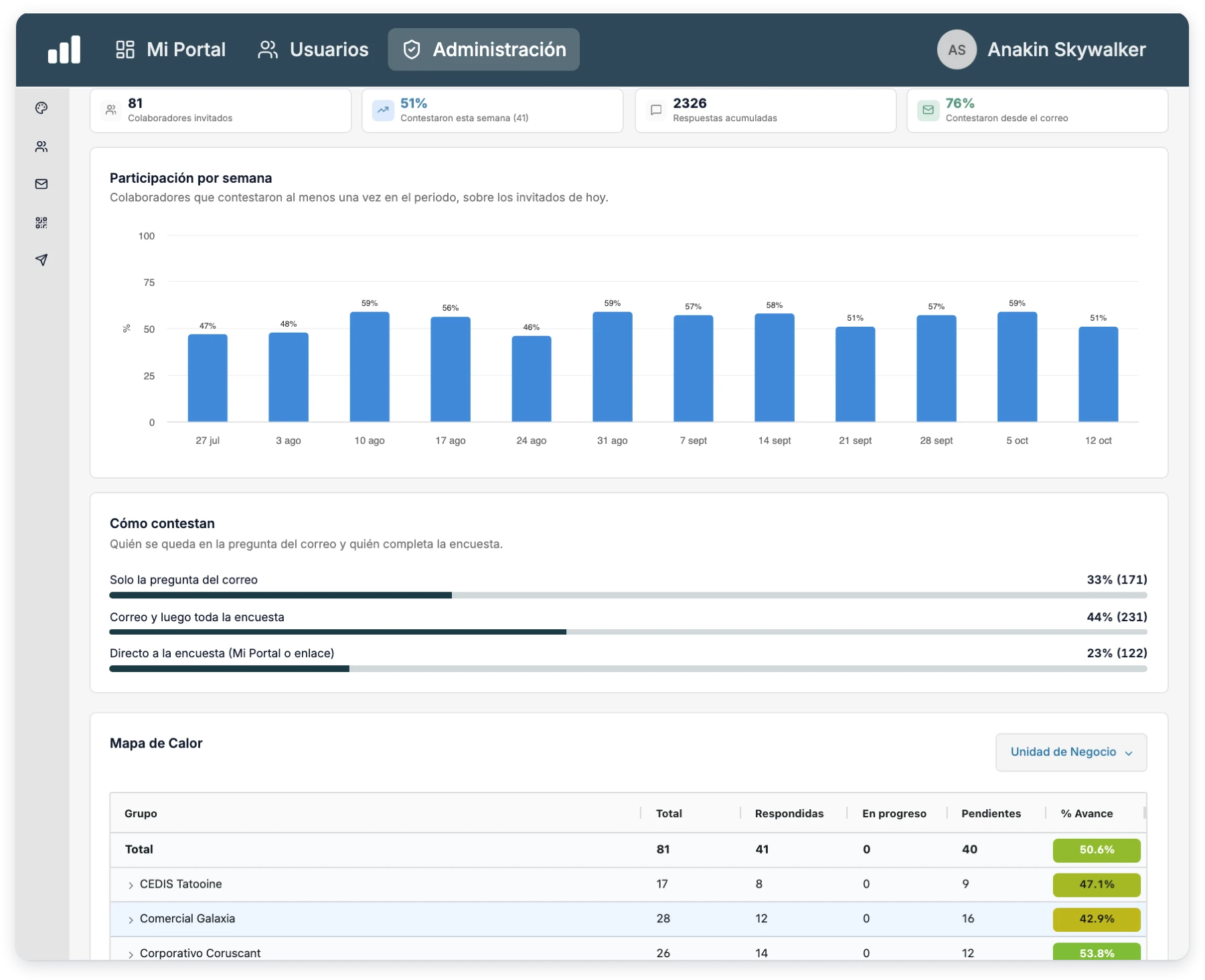
  • Invited and answeredHow many answered this period and how many responses you've collected overall.
  • How they answerEmail only, email plus the full survey, or straight from My Portal.
  • Participation by periodBy week, month or quarter.
  • Status per employeeLast answer and number of answers for each person.
See the progress in a demo →
Happiness survey progress with participation by period and how people answer
Step 04 · You read the results

Happiness in every area, period after period

A clear index, its trend and a heat map to spot where it's rising and where it's falling.
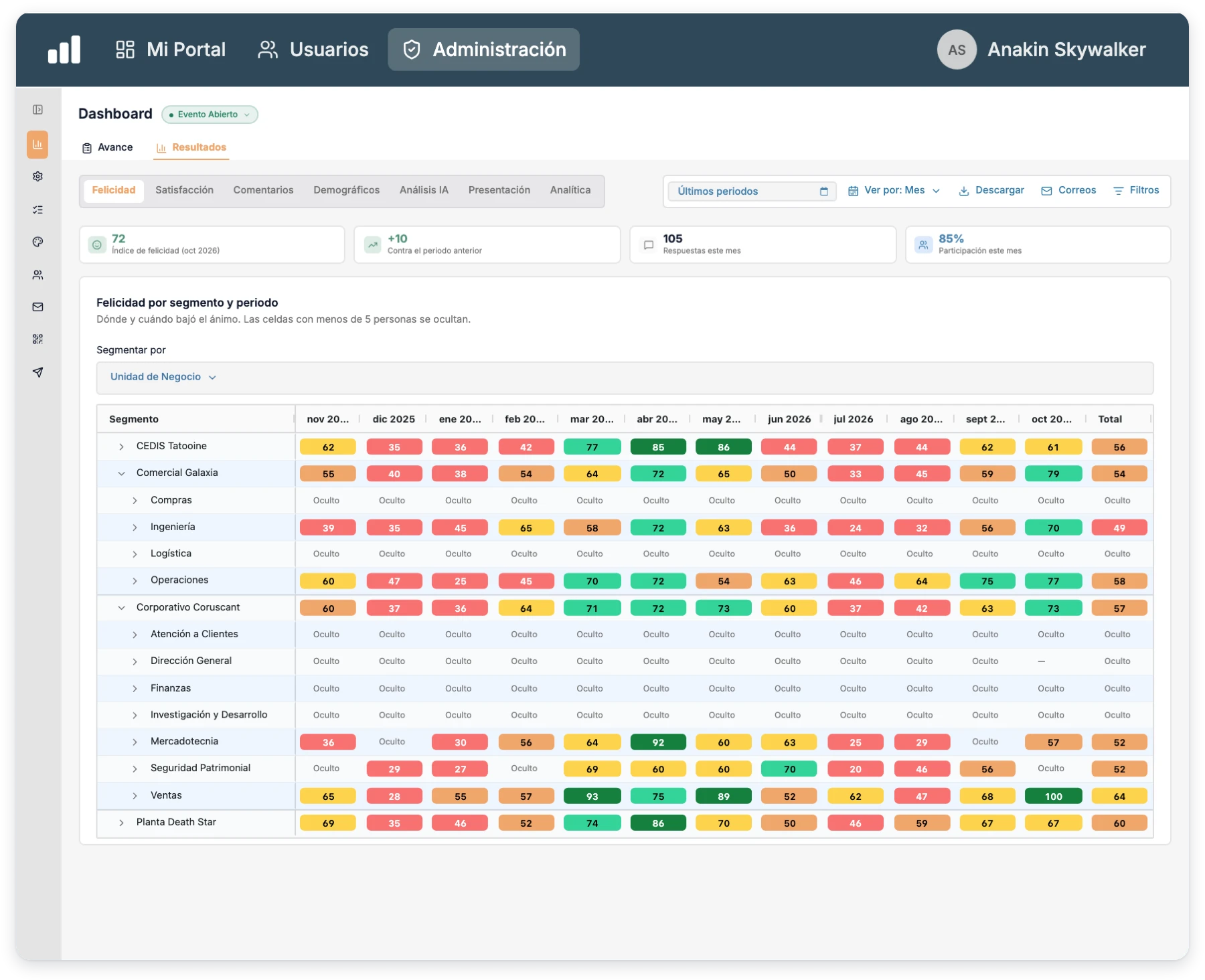
  • Happiness indexShare of favorable answers, with the change versus the previous period.
  • Heat mapHappiness by area, position or location in each period, hiding groups under 5 people.
  • Your own rangesDefine the values where a result is good or needs attention.
  • AI and exportsAI analysis of comments, plus results in Excel and PDF.
See the results in a demo →
Happiness heat map by area and period colored by range

We protect your operation on three fronts.

Beyond measuring your team's happiness, the platform safeguards continuity, access, and interoperability, so your operation never depends on improvisation.

Cybersecurity

Controls to reduce risk and protect access

  • Visibility permissions by user and role
  • Your own password or SSO access
  • Secure connections over HTTPS
  • Activity traceability
Backups

Continuity so you never lose critical information

  • Scheduled database backups
  • Incident recovery
  • Exportable files for extra safekeeping
  • Historical data availability
Integrations

Connectivity to work with your current stack

  • Microsoft 365
  • Google Workspace
  • Integratec API
  • SMTP / SSO / SAML
  • Webhooks

Frequently asked questions about employee happiness

How often is happiness measured?

You decide: once a day, a week, a month or a quarter. The invitation goes out on its own and is never sent on weekends.

What do employees have to do?

Just click an emoji in the email. That counts as their answer, and they can continue with the rest of the survey if they want.

Are the answers anonymous?

The survey is named, but results are read by group and the heat map hides any segment with fewer than 5 people.

How is the happiness index calculated?

It's the share of favorable answers in the period (good and very good, or 9 and 10 if you use eNPS), compared with the previous period.

Can I add more questions?

Yes. On top of the email question you can add dimensions, scales and open questions, like any survey on the platform.

Is this just software?

No. It's software, human support and AI agents in a single experience. We help you define the frequency, questions and segments, and launch without friction.

Next step

If you want to know how your team feels without waiting for the annual survey, we'd love to show you how.